Clean Architecture in .NET 8: A Real-World Breakdown
Last Updated: May 28, 2026
Table of Contents
- Why Clean Architecture at All?
- The Project Structure
- Layer 1: Domain — The Center of Everything
- Layer 2: Application — Where Use Cases Live
- Layer 3: Infrastructure — The External World
- Layer 4: WebApi — Thin Controllers Only
- The Unit Tests
- What You'd Add for a Real Project
- Frequently Asked Questions
Most .NET tutorials show you how to build something. This one focuses on how to structure your application. You'll quickly see why this distinction matters so much once you're six months deep into a project.
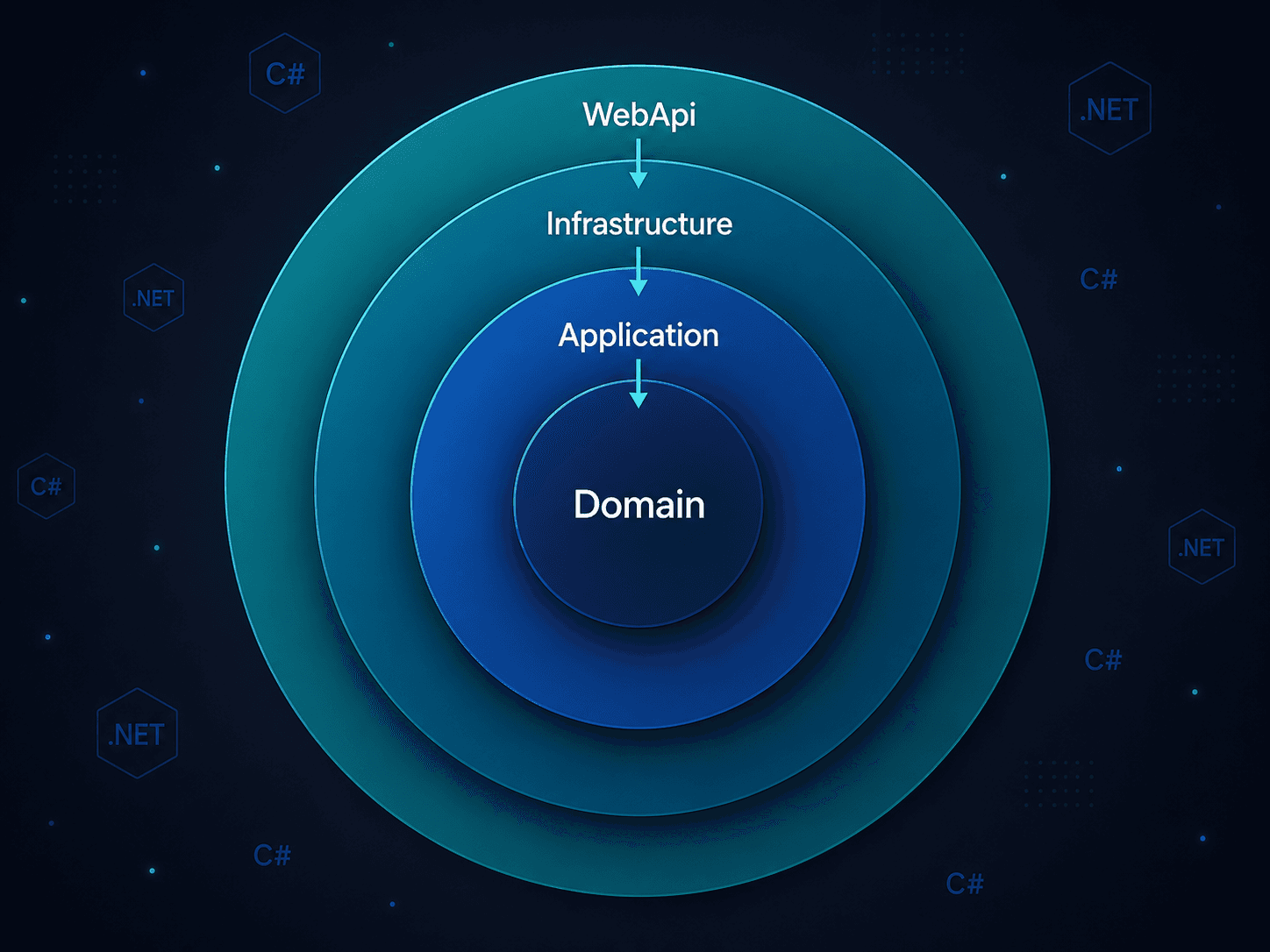
Jenil Sojitra's CleanArchitectureDemo is a GitHub repo that does exactly one thing: it shows you how Clean Architecture looks in a working .NET 8 solution. No fluff. No over-engineered microservices. Just the four core layers: Domain, Application, Infrastructure, and WebApi. Each layer does its job perfectly and stays out of everyone else's way.
41 stars and 14 forks later, it's become a solid reference point for .NET developers trying to get their project structure right before the codebase turns into a mess.
Here's what's actually in it, and why each piece is set up the way it is.
Why Clean Architecture at All?
Before getting into the code, worth asking: why bother?
The short answer is that most apps don't start out messy. They gradually become messy over time. You write a controller that calls a service. The service calls EF Core directly. You add business logic to the controller because it's faster. Six months later, the controller has 300 lines, the service is untestable because it depends on a real database, and you're afraid to touch either.
Clean Architecture is Robert C. Martin's answer to that pattern. The idea is that business rules should be the center of the application, not an afterthought wrapped around a database. Everything else, like the API, the ORM, or the file system, is a detail that can be swapped or mocked easily.
The practical payoff: you can test your business logic without spinning up a database. You can change your ORM without touching domain code. Controllers stay thin because they genuinely have nowhere else to put logic.
The Project Structure
The repo follows a five-project solution layout:
1CleanArchitecture/
2├── Domain/               # Entities, interfaces, business rules
3├── Application/          # DTOs, service interfaces, service logic
4├── Infrastructure/       # EF Core context, repository implementations
5├── WebApi/               # Controllers, Program.cs, middleware
6└── UnitTests/            # Tests for all three inner layers
The dependency direction matters here. Domain knows nothing about anyone. Application knows Domain. Infrastructure knows both Domain and Application. WebApi knows Application. Nothing points outward.
Layer 1: Domain — The Center of Everything
The Domain layer is the simplest to describe and the hardest to protect. It contains entities and interfaces. That's it.
1// Domain/Entities/Product.cs
2namespace CleanArchitecture.Domain.Entities;
3
4public class Product
5{
6    public int Id { get; set; }
7    public string Name { get; set; } = string.Empty;
8    public decimal Price { get; set; }
9    public string Description { get; set; } = string.Empty;
10}
No EF Core attributes. No [Required]. No [Column]. That's intentional. This class doesn't know it's being persisted anywhere, and that's what makes it testable in isolation.
The interface also lives here:
1// Domain/Interfaces/IProductRepository.cs
2namespace CleanArchitecture.Domain.Interfaces;
3
4public interface IProductRepository
5{
6    Task<IEnumerable<Product>> GetAllAsync();
7    Task<Product?> GetByIdAsync(int id);
8    Task<Product> AddAsync(Product product);
9    Task UpdateAsync(Product product);
10    Task DeleteAsync(int id);
11}
Notice that the interface is in Domain, but the implementation is in Infrastructure. This is the Dependency Inversion Principle at work. The Domain layer defines what it needs; it doesn't care how it's fulfilled. You could swap SQL Server for Postgres, or EF Core for Dapper, and the Domain layer wouldn't change a line.
"This template provides a solid foundation for building scalable, maintainable, and testable applications."
Layer 2: Application — Where Use Cases Live
The Application layer is where the actual work happens. It orchestrates the domain, defines service contracts, and holds DTOs, but it never touches the database directly.
1// Application/DTOs/ProductDto.cs
2namespace CleanArchitecture.Application.DTOs;
3
4public class ProductDto
5{
6    public int Id { get; set; }
7    public string Name { get; set; } = string.Empty;
8    public decimal Price { get; set; }
9    public string Description { get; set; } = string.Empty;
10}
DTOs exist to decouple what the API sends and receives from what the Domain actually stores. If you want to add a DiscountedPrice to what you return without modifying the entity, you do it here.
The service interface:
1// Application/Interfaces/IProductService.cs
2namespace CleanArchitecture.Application.Interfaces;
3
4public interface IProductService
5{
6    Task<IEnumerable<ProductDto>> GetAllProductsAsync();
7    Task<ProductDto?> GetProductByIdAsync(int id);
8    Task<ProductDto> CreateProductAsync(ProductDto productDto);
9    Task UpdateProductAsync(int id, ProductDto productDto);
10    Task DeleteProductAsync(int id);
11}
And the implementation, which talks to the repository interface (not EF Core directly):
1// Application/Services/ProductService.cs
2namespace CleanArchitecture.Application.Services;
3
4public class ProductService : IProductService
5{
6    private readonly IProductRepository _repository;
7
8    public ProductService(IProductRepository repository)
9    {
10        _repository = repository;
11    }
12
13    public async Task<IEnumerable<ProductDto>> GetAllProductsAsync()
14    {
15        var products = await _repository.GetAllAsync();
16        return products.Select(p => new ProductDto
17        {
18            Id = p.Id,
19            Name = p.Name,
20            Price = p.Price,
21            Description = p.Description
22        });
23    }
24
25    public async Task<ProductDto?> GetProductByIdAsync(int id)
26    {
27        var product = await _repository.GetByIdAsync(id);
28        if (product == null) return null;
29        return new ProductDto
30        {
31            Id = product.Id,
32            Name = product.Name,
33            Price = product.Price,
34            Description = product.Description
35        };
36    }
37
38    public async Task<ProductDto> CreateProductAsync(ProductDto productDto)
39    {
40        var product = new Product
41        {
42            Name = productDto.Name,
43            Price = productDto.Price,
44            Description = productDto.Description
45        };
46        var created = await _repository.AddAsync(product);
47        productDto.Id = created.Id;
48        return productDto;
49    }
50
51    public async Task UpdateProductAsync(int id, ProductDto productDto)
52    {
53        var product = new Product
54        {
55            Id = id,
56            Name = productDto.Name,
57            Price = productDto.Price,
58            Description = productDto.Description
59        };
60        await _repository.UpdateAsync(product);
61    }
62
63    public async Task DeleteProductAsync(int id)
64    {
65        await _repository.DeleteAsync(id);
66    }
67}
This is a clean separation. The ProductService doesn't know EF Core exists. You could run every method in this class in a unit test with a mocked IProductRepository and no real database required.
Layer 3: Infrastructure — The External World
This is where you finally touch EF Core. The Infrastructure layer holds the DbContext and the concrete repository implementations. It knows about both Domain and Application, but nothing depends on it except WebApi (through DI registration).
1// Infrastructure/Data/ApplicationDbContext.cs
2namespace CleanArchitecture.Infrastructure.Data;
3
4public class ApplicationDbContext : DbContext
5{
6    public ApplicationDbContext(DbContextOptions<ApplicationDbContext> options)
7        : base(options) { }
8
9    public DbSet<Product> Products => Set<Product>();
10}1// Infrastructure/Repositories/ProductRepository.cs
2namespace CleanArchitecture.Infrastructure.Repositories;
3
4public class ProductRepository : IProductRepository
5{
6 private readonly ApplicationDbContext _context;
7
8 public ProductRepository(ApplicationDbContext context)
9 {
10 _context = context;
11 }
12
13 public async Task<IEnumerable<Product>> GetAllAsync()
14 => await _context.Products.ToListAsync();
15
16 public async Task<Product?> GetByIdAsync(int id)
17 => await _context.Products.FindAsync(id);
18
19 public async Task<Product> AddAsync(Product product)
20 {
21 _context.Products.Add(product);
22 await _context.SaveChangesAsync();
23 return product;
24 }
25
26 public async Task UpdateAsync(Product product)
27 {
28 _context.Products.Update(product);
29 await _context.SaveChangesAsync();
30 }
31
32 public async Task DeleteAsync(int id)
33 {
34 var product = await _context.Products.FindAsync(id);
35 if (product != null)
36 {
37 _context.Products.Remove(product);
38 await _context.SaveChangesAsync();
39 }
40 }
41}The repo uses an InMemory database by default, which makes perfect sense for a demo. It means you can run dotnet run without installing SQL Server. Swap it for a real connection string when you're ready.
"The solution includes comprehensive unit tests for all layers: Domain Tests, Application Tests, Infrastructure Tests."
Layer 4: WebApi — Thin Controllers Only
The controller's job is to handle HTTP, nothing else. Business logic that leaks into controllers is technical debt that compounds fast.
1// WebApi/Controllers/ProductsController.cs
2namespace CleanArchitecture.WebApi.Controllers;
3
4[ApiController]
5[Route("api/[controller]")]
6public class ProductsController : ControllerBase
7{
8    private readonly IProductService _service;
9
10    public ProductsController(IProductService service)
11    {
12        _service = service;
13    }
14
15    [HttpGet]
16    public async Task<IActionResult> GetAll()
17        => Ok(await _service.GetAllProductsAsync());
18
19    [HttpGet("{id}")]
20    public async Task<IActionResult> GetById(int id)
21    {
22        var product = await _service.GetProductByIdAsync(id);
23        return product == null ? NotFound() : Ok(product);
24    }
25
26    [HttpPost]
27    public async Task<IActionResult> Create([FromBody] ProductDto dto)
28    {
29        var created = await _service.CreateProductAsync(dto);
30        return CreatedAtAction(nameof(GetById), new { id = created.Id }, created);
31    }
32
33    [HttpPut("{id}")]
34    public async Task<IActionResult> Update(int id, [FromBody] ProductDto dto)
35    {
36        await _service.UpdateProductAsync(id, dto);
37        return NoContent();
38    }
39
40    [HttpDelete("{id}")]
41    public async Task<IActionResult> Delete(int id)
42    {
43        await _service.DeleteProductAsync(id);
44        return NoContent();
45    }
46}
Five endpoints. Each one delegates immediately to the service. No manual mapping, no business rules, no database calls. That's what thin controllers look like.
The DI wiring in Program.cs:
1// WebApi/Program.cs (relevant registrations)
2builder.Services.AddDbContext<ApplicationDbContext>(options =>
3    options.UseInMemoryDatabase("CleanArchDB"));
4
5builder.Services.AddScoped<IProductRepository, ProductRepository>();
6builder.Services.AddScoped<IProductService, ProductService>();
The Unit Tests
The test project covers all three inner layers. The Application layer tests are the most interesting because they show the payoff of all that interface work:
1// UnitTests/Application/ProductServiceTests.cs
2public class ProductServiceTests
3{
4    private readonly Mock<IProductRepository> _mockRepo;
5    private readonly IProductService _service;
6
7    public ProductServiceTests()
8    {
9        _mockRepo = new Mock<IProductRepository>();
10        _service = new ProductService(_mockRepo.Object);
11    }
12
13    [Fact]
14    public async Task GetAllProductsAsync_ReturnsAllProducts()
15    {
16        // Arrange
17        var products = new List<Product>
18        {
19            new() { Id = 1, Name = "Test Product", Price = 9.99m }
20        };
21        _mockRepo.Setup(r => r.GetAllAsync()).ReturnsAsync(products);
22
23        // Act
24        var result = await _service.GetAllProductsAsync();
25
26        // Assert
27        Assert.Single(result);
28        Assert.Equal("Test Product", result.First().Name);
29    }
30}
No database. No EF Core. Just a mock and an assertion. This is what makes the architecture worth the extra files. You can test the entire business logic layer in milliseconds.
Domain tests check entity behavior directly. Infrastructure tests use an actual InMemory ApplicationDbContext to verify that repository methods work correctly.
What the Repo Does Well
A few things stand out.
- The layer boundaries are actually enforced. Some "Clean Architecture" repos have Domain classes referencing EF Core attributes, or services calling
DbContextdirectly. This one doesn't. Each layer genuinely depends only on what it should. - InMemory database as the default is the right call for a template. It lets anyone run
dotnet runand see a working API with Swagger in under two minutes. If you want SQL Server, the swap is one line inProgram.cs. - The test structure mirrors the solution structure.
UnitTests/Domain/,UnitTests/Application/, andUnitTests/Infrastructure/: each folder tests the corresponding project. It's obvious where to add new tests as the project grows. - Async all the way down. Every repository method, every service method, every controller action uses
async/await. Not every demo does this correctly, and it matters when you move to production load.
What You'd Add for a Real Project
The demo covers the structural foundation. For a production system, you'd layer in:
- MediatR + CQRS: Split reads and writes into separate handlers. Helps when queries and commands have different performance and validation needs.
- FluentValidation: Validation rules in the Application layer, not in the controller or entity.
- AutoMapper: The manual DTO mapping in
ProductServiceworks fine at demo scale but gets tedious with 15 fields per entity. - Error handling middleware: A global exception handler in WebApi that translates domain exceptions into proper HTTP responses.
- Pagination and filtering: The
GetAllAsyncmethod returns everything, which is fine for a demo but dangerous with real data. - Real database migrations: Switch from InMemory to SQL Server or Postgres with EF Core migrations for anything beyond development.
None of these change the architecture. They plug in at the appropriate layer.
Who This Is Actually For
If you're trying to get a feel for what Clean Architecture looks like in real code, beyond just theory and diagrams, this repo is a fantastic starting point. It's small enough to read in an afternoon, structured well enough that the patterns are visible, and the test coverage makes the "why" of the interfaces clear in a way that just reading about DIP doesn't.
If you're already past this and building something real, treat it as a checklist. Does your Domain layer have zero framework dependencies? Does your Application layer test without a database? Are your controllers under 50 lines? If yes, you're probably in good shape. If no, this repo shows where the line should be.
"Clean Architecture by Robert C. Martin. The Domain layer contains enterprise/business logic with no dependencies on other layers."
Quick Reference: The Dependency Rule
1WebApi
2  └── depends on Application
3        └── depends on Domain (interfaces, entities)
4              ↑
5        Infrastructure also depends on Domain + Application
6        (to implement the interfaces)
Nothing in Domain knows about Application, Infrastructure, or WebApi. That's the whole game.